Dynamic Emails - SAN Business Solutions
Main menu:
- Welcome
- Uploads Mibuso
- Products
- Contact
- Blog
- Common
Products
Dynamic Emails for Microsoft Dynamics 365 Business Central
The Dynamic Emails extension is a powerful email orchestration and merge engine for Microsoft Dynamics 365 Business Central.
It enables businesses to create reusable, topic-driven email scenarios with dynamic templates, generated merge fields, preview tools, and source-data testing.
Designed for both cloud and on-premises Business Central environments and can be extended to support custom business scenarios when required.
Dynamic Emails helps organizations standardize communication, reduce manual work, and deliver personalized emails directly from Business Central using structured, data-driven templates.
Click to Watch: Dynamic Email Templates
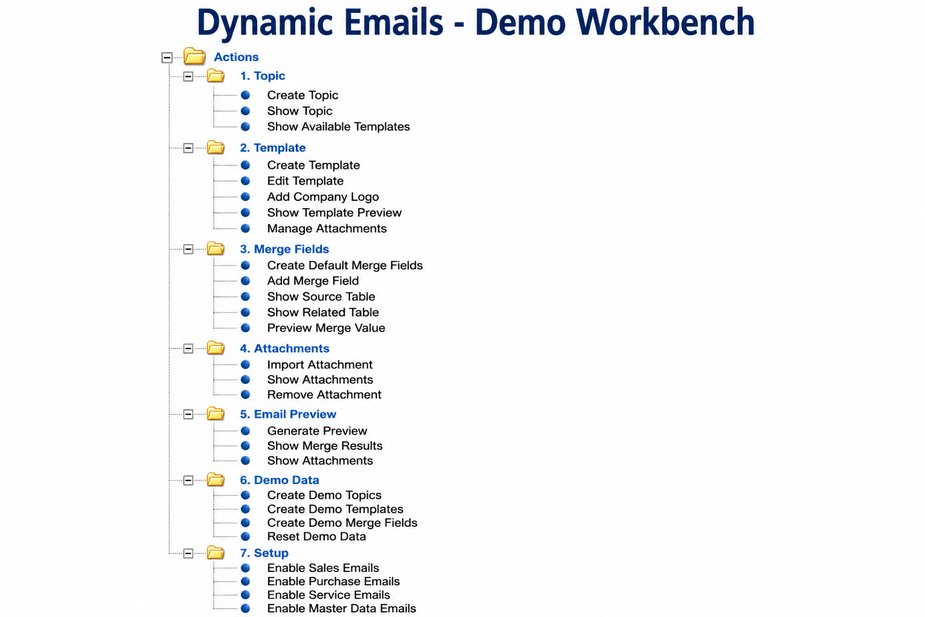
Click to Watch: Dynamics Emails Workbench
Features
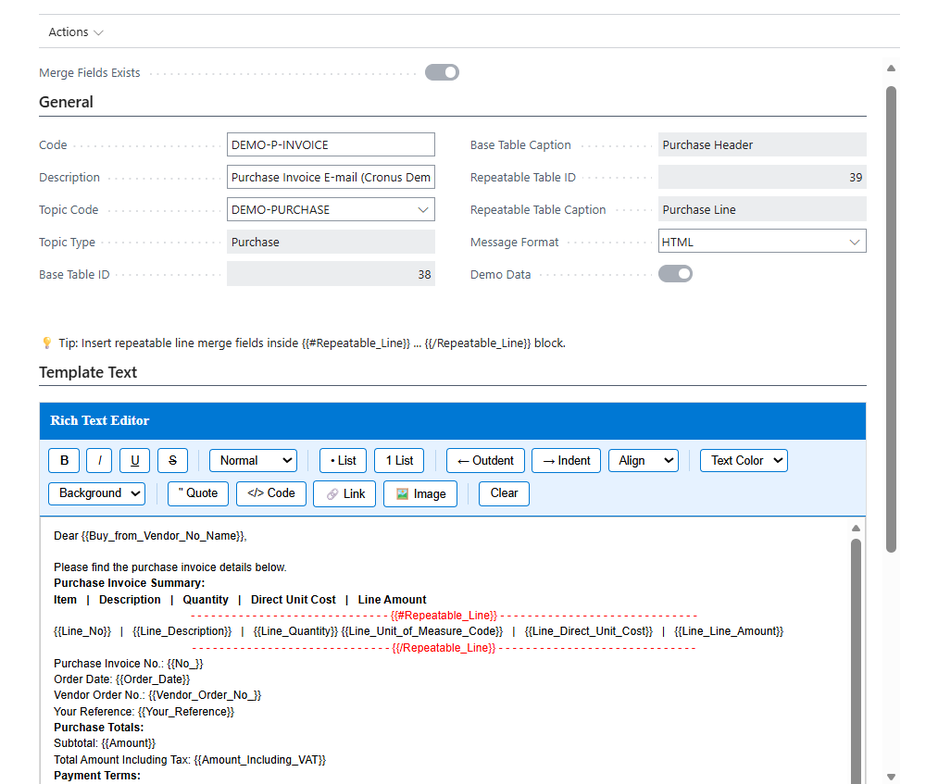
- Dynamic Email Templates: create reusable templates for business processes
- Topic-Driven Scenarios: organize templates by business purpose or communication flow
- Generated Merge Fields: automatically generate placeholders based on source data and business entities
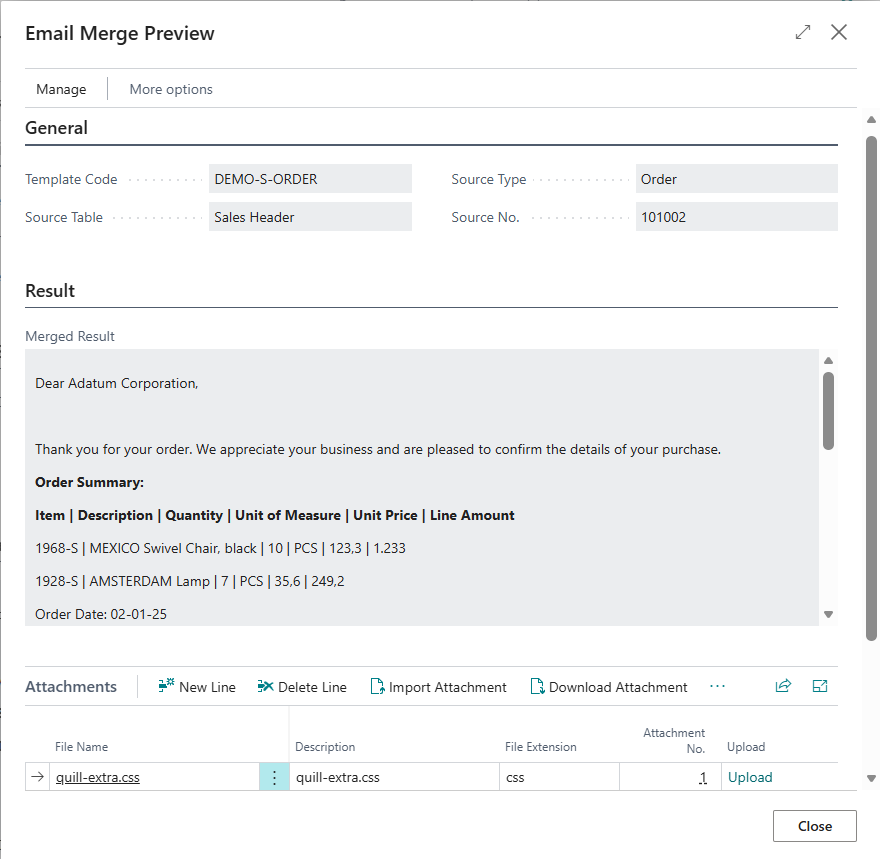
- Resolved Field Preview: inspect generated merge values before merging emails
- Merge Workbench: test the full merge process from source record to final email output
- Template Lifecycle Management: manage creation, maintenance, preview, and testing in one place
- Repeatable Merge Sections: support repeating data such as lines, lists, and document details
- Source Data Testing: validate templates against real business records
- Business Central Integration: integrate directly into Business Central workflows
- Flexible Merge Engine: modular merge processing with scalable architecture
Extensibility
Dynamic Emails is built on a modular topic-based architecture.
The standard app includes predefined business scenarios such as:
- Sales
- Purchase
- Customer
- Vendor
- Contact
- Service and business workflows
Additional custom topics, templates, and merge-field scenarios based on customer-specific Business Central tables can be implemented on request.
Future versions may include support for additional Business Central entities such as Service Contracts, Jobs, Manufacturing Orders, Warehouse Documents, and custom user-defined topics.
This allows organizations to extend the app for:
- Industry-specific tables
- Custom modules
- Vertical solutions
- Customer-specific business processes
 |
 |
 |
Why Dynamic Emails?
Dynamic Emails extends Business Central’s standard email capabilities by providing a flexible, template-driven approach to email generation and document communication.
- Template-Driven Email Management
Traditional custom solutions often require report design, code changes, or hard-coded email logic for each scenarioDynamic Emails allows users to manage email content directly through configurable templates and merge fieldsBenefit: Faster implementation, reduced development effort, and greater business-user independence
- Extensive Merge Field Support
Standard Approach: Email logic is often limited to predefined fieldsDynamic Emails: Supports merge fields from base records, related tables, repeatable line tables, and selected system/setup tablesBenefit: Rich, highly personalized emails without custom development for each scenario
- No Code Changes for New Templates
Standard Approach: New email scenarios often require code modifications and app redeploymentDynamic Emails: New templates can be created and maintained directly in Business CentralBenefit: Faster rollout, zero downtime for template changes, business users control email content
- Repeatable Sections for Document Lines
Standard Approach: Line-item rendering often requires report design or custom developmentDynamic Emails: Built-in repeatable sections support document lines, item lists, and structured repeating contentBenefit: Professional document-style emails with tables and detailed line information
- Preview Before Sending
Standard Approach: Testing often requires sending sample emailsDynamic Emails: Provides preview with resolved merge fields and real data before opening the final email editorBenefit: Reduce errors, validate data quality, and improve communication reliability
- Unified Email Engine Across Business Documents
Traditional Approach: Email logic is often implemented separately for different document areasDynamic Emails: Designed to work across Sales, Purchase, Service, and master-data scenarios using one template engineBenefit: Consistent user experience and reusable email logic across the application
- Multi-Language Ready
Standard Approach: Language-specific customization often requires separate maintenanceDynamic Emails: Supports Business Central localization and multilingual deployments (EN, NL, DE, FR, ES and more)Benefit: Suitable for international environments with localized user experience
- Flexible Attachment Support
Standard Approach: Attachment logic is often hard-codedDynamic Emails: Templates can include linked attachments and document-related filesBenefit: More complete and professional business communication without code changes
- Centralized Template Administration
Standard Approach: Email logic may be spread across reports, pages, and codeunitsDynamic Emails: Provides centralized management of topics, templates, merge fields, attachments, and settingsBenefit: Easier maintenance, better governance, and consistent communication standards
- Lightweight HTML-Based Rendering
Traditional Approach: Complex report-based email rendering can increase maintenance effortDynamic Emails: Uses flexible HTML-based template rendering integrated with Business Central email workflowsBenefit: Easier template maintenance and simplified email design process
- Native Business Central Email Editor Integration
Standard Approach: Custom solutions often replace or bypass standard email UXDynamic Emails: Generates email content and opens it in Business Central’s standard Email EditorBenefit: Familiar user experience, standard sending workflow, and native BC integration