Inventory Dashboard Dynamics 365 BC - SAN Business Solutions
Main menu:
- Welcome
- Uploads Mibuso
- Products
- Contact
- Blog
- Common
Products
Inventory Dashboard for Microsoft Dynamics 365 Business Central
Business Central add-on that provides clear, actionable insights into inventory performance. It helps organizations make better purchasing and stocking decisions by turning raw inventory data into meaningful KPIs and reports.
The app is designed for supply chain managers, operations teams, and finance professionals who need fast answers to questions such as:
- Where do we risk running out of stock?
- Which items are tying up too much capital?
- How efficiently is our inventory turning over?
Key Features
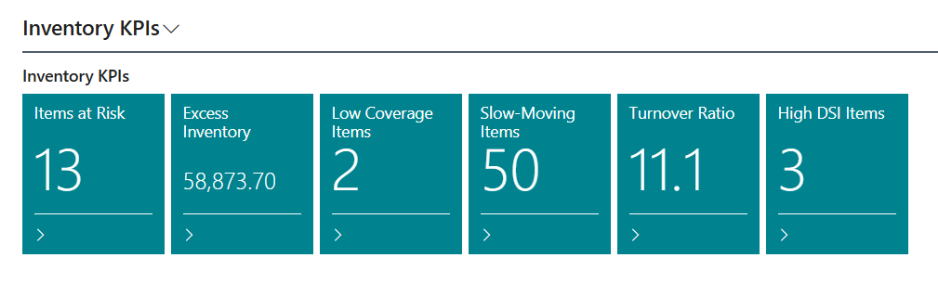
Inventory KPIs
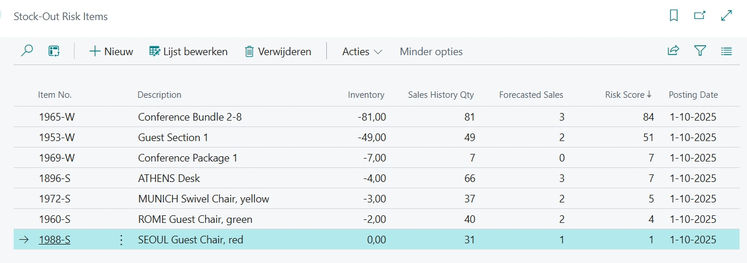
- Stock-Out Risk – Identify items at risk of running out based on recent sales trends.
- Coverage Days – See how long current inventory will last given historical demand.
- Slow-Moving Items – Detect items with low sell-through rates.
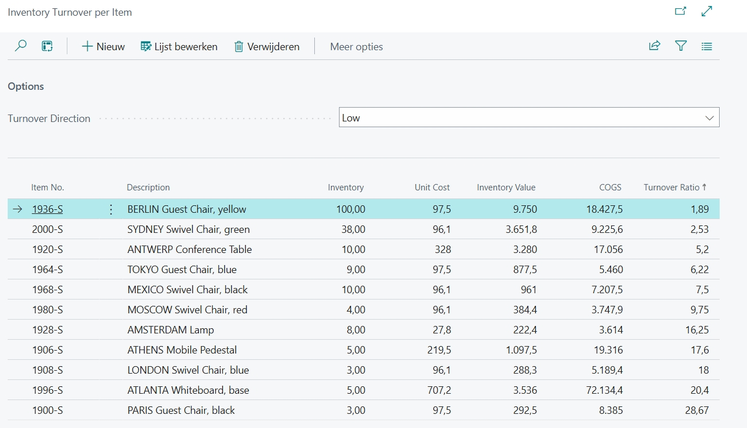
- Inventory Turnover – Measure how efficiently inventory is converted into sales.
- Days Sales of Inventory (DSI) – Monitor inventory holding periods.
Dashboards & Lists
- Centralized dashboard with sortable and filterable KPIs.
- Item-level views for detailed analysis.
- Excel export for further reporting and analysis.
Flexible Configuration
- Configurable history periods and thresholds.
- Support for different costing and sales calculation methods.Benefits
- Improve inventory availability while reducing excess stock.
- Increase inventory transparency for operational and financial teams.
- Support data-driven purchasing and replenishment decisions.
- Reduce manual analysis and spreadsheet work.
- Seamlessly integrates with standard Business Central functionality.
Designed for Business Central
- Built using standard Business Central tables and processes.
- No external services or data transfers.
- Works fully inside the customer’s Business Central tenant.
- Compatible with both Essentials and Premium editions.
- helps companies monitor and improve inventory performance.
Features
----------------------------------------------------------------------------------------------------------------------------------------------
Cues & KPIs: Real-time dashboard tiles for: | |
| |
List Pages: Drill down into detailed buffers: | |
| |
 | |
 | |
| Reports: Export to PDF/Excel for analysis: | |
| |
Setup Options: | |
| |
Benefits: | |
| |
Installation: | |
1. Download the `.app` file from the [Releases](../../releases) section. 2. Publish and install the extension in your Business Central environment using: powershell Publish-BCContainerApp -containerName <YourContainer> -appFile "<PathToAppFile>" -install | |
Inventory Dashboard gives you the visibility you need to balance availability, cost, and efficiency — all within Microsoft Dynamics 365 Business Central.